Conversation
A natural conversation, right beside the character.
Responses stream near the character's face. Alongside history, useful names and preferences can be reviewed and deleted as character-specific long-term memory.
 CharaDockDESKTOP COMPANION
Windows desktop companion
It listens, remembers what matters to you, and builds with Codex inside a character home or a project you choose. Results open right inside the conversation, with your PuruPuru companion always nearby.
v0.4.1 · Windows 10/11 x64 · Pre-release

TRANSPARENT AVATAR
VOICE & REALTIME
CODEX WORK MODE
LIVE PREVIEW
One companion, many roles
It appears when needed and returns to quiet when the moment passes. Staying out of your way is part of the design.
Conversation
Responses stream near the character's face. Alongside history, useful names and preferences can be reviewed and deleted as character-specific long-term memory.
Alive, not distracting
Just enough life while idle. Interact with the character and it responds with its own expression and words.
Codex Work
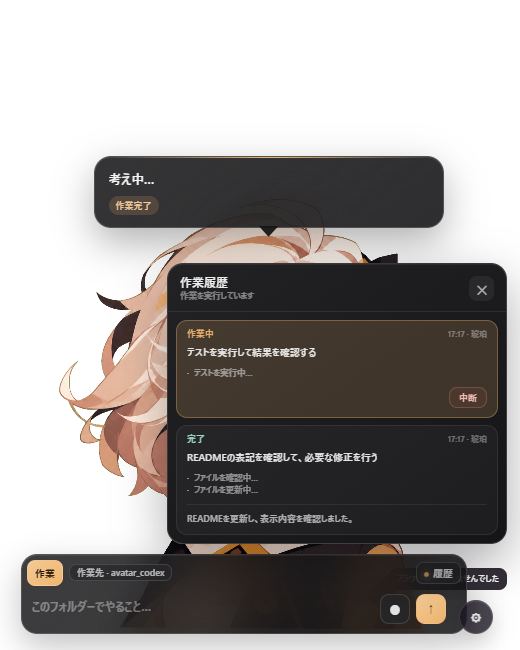
Codex works only inside the active Character Home or attached project. Progress, operations, and results stay in history, and a turn can be interrupted at any time.
Codex Avatar Studio
Generate eye, mouth, expression, and hair layers together with initial motion settings, personality, and speaking style. The result is ready to use as a PuruPuru character.
Voice
Explicitly choose Codex Realtime, local sherpa-onnx, system recognition, or OpenAI transcription. Speech providers and voices are stored per character.
Permission in context
Screen sharing and browser control ask first. Only a clear continuation of the same operation can reuse permission for up to five minutes.
Character Home + artifact preview
Each character gets a durable home for notes, artifacts, and project continuity. Attach an existing folder without moving it, switch the active workspace, and open what Codex created without leaving the conversation.
A calm, responsive landing page with clear hierarchy and a focused call to action.
✓ Responsive layout
✓ Accessible interactions
✓ Previewed in CharaDock
Designed for the desktop
Edge snapping, position locking, multiple monitors, and per-character size and motion controls. The interface adapts to light and dark appearance and to each character's palette.
Five personalities included
Selecting a character changes both the interface accent and the tone of the conversation.
AI Nike-chan is included with permission. Credit: tegnike · Official site
Permission, privacy, control
CharaDock never receives the authentication token.
A clear continuation lasts up to five minutes. Another site or purpose asks again.
Conversation is read-only; Work can modify only the location you choose.
For builders
Use Node.js 22 or later. Codex features also require the Codex CLI.
npm ci
npm run desktop
A small companion for big work
An unofficial derivative of PuruPuru PNGTuber. Review the terms for included visual assets before distribution.